I wanted to see what happens when a model only makes the decision and code does everything else. Over the last few weeks I experimented with Jev, a decision model from TypeSafe AI. It doesn't write text. You give it some state and typed questions about that state, and it answers with a choice, a probability for every option, and a confidence.
The idea I tested is simple. The model makes the judgment call, and code stays in charge: it builds the options, checks the confidence, does the math and changes the data. Jev decides, and code acts.
Here is the kind of thing that works. Say this to a to-do app:
"I need to buy some milk and mark take out trash as done and move the dentist to Friday."
That is three requests in one breath: add, complete, reschedule. The app handled it with three model calls that ran in parallel, and one of them stopped and asked me, "Which task?" because it wasn't sure.
To test the idea beyond one case, I tried it on five small apps with different kinds of decisions: a voice to-do list, a Wikipedia walker, a video highlight cutter, an image classifier and a Chrome extension that operates a flight search page. For each one I cover what Jev decides, what code keeps, and the request I send to Jev. Then I list the practices that held up across all of them.
What is a decision model?
A decision model takes state (text or JSON) and typed questions about that state, and gives you typed answers back. It does not generate text, so there is nothing to parse.
Every Choice answer comes with a probability for each of your options and a confidence, which says how peaked that distribution is. You can sort by it, threshold it, and route on it with plain if statements. There are four question types:
| Question type | Asks | Returns |
|---|---|---|
choice | Pick one option from a list (up to 255) | the choice, a probability for every option, a confidence |
noul | Is this statement true? | a probability from 0 to 1 |
score | Rate this against an ordered scale | a score, a probability for every level, a confidence |
box | Where is this in an image? | its location in the image |
Everything goes through one endpoint, POST https://api.typesafe.ai/v1/systemone, and a request always has the same three parts: model, state and questions. I only used choice and noul. Jev 1.14 costs $0.042 per million input tokens, and output tokens are free.
The five apps
App 1: Voice to-do
What it does. You speak or type a command and the list updates, even when the command has several parts and the phrasing is loose. It can create, complete, delete, set a due date, assign, move a task to a project, set priority, rename, sort and filter.
How Jev helps. Code splits the sentence into clauses and narrows the task list to the best 8 candidates. Then Jev answers 14 questions per clause in one request.
- Jev decides what the user wants: the action, which task, which teammate or project, and how the date was said.
- Code reads only the answers that action needs, works out the real date, and checks confidence before it changes anything.
- Code updates the list. Jev never touches it.
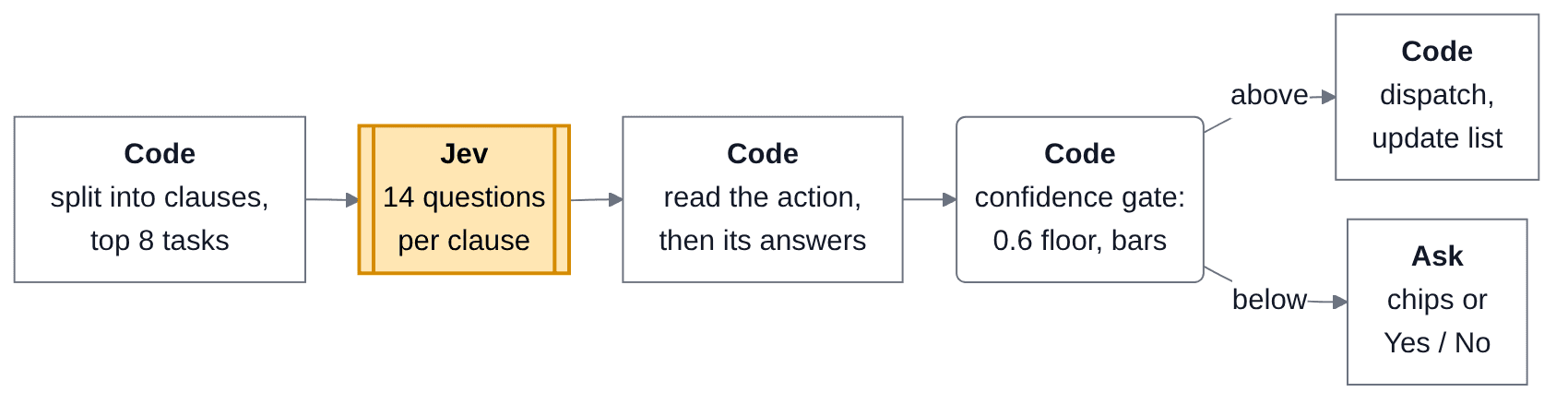
The to-do app. Orange is Jev, plain boxes are code.
The Jev request. This is one clause, "delete the laundry task". Four of the 14 questions are shown, and the options are trimmed:
{
  "state": { "request": "delete the laundry task" },
  "questions": {
    "action": {
      "type": "choice",
      "instructions": "Which action does the user ask the to-do app to perform in `request`?",
      "criteria": {
        "delete": { "what": "Remove an existing task from the list entirely", "not_for": "Marking a task as done" },
        "set_due": { "what": "Change WHEN an existing task is due…", "not_for": "Moving a task to a different project or list" },
        "none": { "what": "None of the above", "examples": ["chit-chat", "filler words"] },
        "...": "13 options in all"
      }
    },
    "task": {
      "type": "choice",
      "instructions": "If `request` refers to a task that is already on the list, which task is it? Pick none if it describes a new task or no task.",
      "criteria": {
        "do_laundry": "Do laundry (in Personal)",
        "none": "None of these tasks: a new task, or no task is mentioned"
      }
    },
    "day_anchor": {
      "type": "choice",
      "instructions": "If `request` gives a due day or date, how is that day expressed?",
      "criteria": { "tomorrow": "Tomorrow", "named_weekday": "A named day of the week such as Friday or next Monday", "none": "No day or date is mentioned", "...": "..." }
    },
    "finished": {
      "type": "noul",
      "instructions": "Is `request` a complete instruction, rather than cut off mid-sentence while the user is still speaking?"
    }
  }
}
Back come the chosen option, a probability for every option and a confidence for each Choice, and a single probability for each Noul. The app reads the action first and ignores the rest of the answers if it doesn't need them.
A real clause. From my logs, "complete dentist appointment" matched two tasks. Only the action and task questions are shown, and the task options are the ones code narrowed down:
{
  "state": { "request": "complete dentist appointment" },
  "questions": {
    "action": { "...": "same menu as above" },
    "task": {
      "type": "choice",
      "instructions": "If `request` refers to a task that is already on the list, which task is it? Pick none if it describes a new task or no task.",
      "criteria": {
        "book_dentist_appointment": "Book dentist appointment (in Personal)",
        "none": "None of these tasks: a new task, or no task is mentioned",
        "hello_please_book_dentist_appointment": "Hello please book dentist appointment (in Inbox)"
      }
    },
    "...": "12 more questions"
  }
}
It came back in 319 ms:
{
  "action": { "choice": "complete", "confidence": 1 },
  "task": {
    "choice": "none",
    "confidence": 0.49,
    "probabilities": { "book_dentist_appointment": 0.27, "none": 0.66, "hello_please_book_dentist_appointment": 0.07 }
  },
  "finished": 0.85,
  "actionable": 0.89
}
The action is certain, but the task is not. Completing needs a task confidence of 0.7, so the app asked "Which task?" with a chip for each candidate instead of guessing.
App 2: Wikipedia walker
What it does. There is an old game: click the first link in any Wikipedia article, repeat, and you eventually land on Philosophy. This app replaces "first link" with a model that picks which link leads closer to a goal, and draws the walk live.
How Jev helps. This is the simplest app and the cleanest picture of the split.
- Code fetches the page, takes the first 30 unvisited links, and attaches short descriptions.
- Jev answers one question per page: which of these links leads closer to the goal? It returns a probability for every link.
- Code averages two orderings of the question, follows the top link, and handles the visited set, backtracking, caching and rate limits.

The Wikipedia walker. Orange is Jev, plain boxes are code.
The Jev request. One hop, from Sachin Tendulkar toward Philosophy. Three of up to 30 links are shown:
{
  "model": "jev-1.14.0",
  "state": {
    "task": "Reach `goal_page` on Wikipedia by following one link at a time, in as few steps as possible.",
    "current_page": { "title": "Sachin Tendulkar", "description": "Indian cricketer (born 1973)" },
    "goal_page": { "title": "Philosophy", "description": "Study of general and fundamental questions" }
  },
  "questions": {
    "next_link": {
      "type": "choice",
      "instructions": {
        "question": "Which of these links on `current_page` leads closer to `goal_page`?",
        "focus": "Pick the article whose topic is most closely related to `goal_page.title`, or the broader, more general topic from which `goal_page.title` is easiest to reach."
      },
      "criteria": {
        "Cricket": "Team sport played with a bat and ball",
        "Mumbai": "Capital city of Maharashtra, India",
        "Bharat Ratna": "Highest civilian award of India"
      }
    },
    "next_link_reordered": { "...": "same question, options in reverse order" }
  }
}
Back come two probability maps over the same links, one per order. Code averages them and follows the highest score.
App 3: Video searcher
What it does. You type a question and get a highlight reel cut from real video. The library is four public-domain NASA videos about Artemis, spacesuits, training and lunar landers. I asked: "How will astronauts move around and work on the lunar surface?"
How Jev helps. It works in three rounds, with code in between.
- Round 1: Jev picks the best passages in each video for the query.
- Round 2: Jev decides, sentence by sentence, whether each one is part of the answer.
- Round 3: Jev decides whether each clip should start or end one sentence earlier, stay, or go one sentence later.
- Code splits the captions into sentences and passages, merges spans, and builds the edit list. Jev never sees a timestamp.

The video searcher. Orange is Jev, plain boxes are code.
The pipeline. Transcript to words to sentences to passages is all code. NASA's captions come with word timings, code groups the words into 424 sentences (split at end punctuation or a 3 second pause) and then into 91 passages of 3 to 5 sentences. Each gets an id like moon-s021 or moon-p05, and those ids are what Jev answers with.
Jev request 1: which passage? Round 1 for one video. Passages and options are trimmed:
{
  "model": "jev-1.14.0",
  "state": {
    "task": "Find the passages of these video transcripts that answer `query`.",
    "query": "How will astronauts move around and work on the lunar surface?",
    "videos": {
      "moon": {
        "title": "How We Are Going to the Moon",
        "passages": {
          "moon-p00": "Between 1968 and 1972, America launched 9 human missions to the Moon…",
          "moon-p01": "So, what will an Artemis mission look like? …"
        }
      }
    }
  },
  "questions": {
    "r1_moon_a": {
      "type": "choice",
      "instructions": {
        "question": "Which passage in `videos.moon.passages` best answers `query`?",
        "focus": "Judge what is actually said in each passage. Prefer a passage that directly explains, describes or shows what `query` asks about over one that only mentions it in passing.",
        "none_rule": "Choose `none` if no passage in `videos.moon.passages` is about `query`."
      },
      "criteria": {
        "moon-p01": null,
        "moon-p05": null,
        "...": null,
        "none": "No passage in `videos.moon.passages` answers `query`"
      }
    },
    "r1_moon_b": { "...": "same, exact reverse order, none first" }
  }
}
Back come probabilities for every passage plus none, in both orders. In the logged run, r1_moon_a picked moon-p05 ("Approaching the Moon, we see the fundamental differences between Artemis and Apollo…") at 0.61, with none at 0.37. Code keeps the top passages plus one sentence either side and sends them to round 2.
Jev request 2: which sentences? The state now holds only the kept spans, as clips of consecutive sentences. Each sentence gets its own Noul:
{
  "state": {
    "task": "Edit clips for a short highlight video that answers `query`. Each clip is a run of consecutive transcript sentences from one video.",
    "query": "How will astronauts move around and work on the lunar surface?",
    "clips": {
      "c01": {
        "video": "How We Are Going to the Moon",
        "sentences": {
          "moon-s020": "Everything needed for lunar missions will be positioned in advance by commercial and international partners.",
          "moon-s021": "This includes rovers, science experiments and human-rated systems on the surface.",
          "moon-s022": "But it also includes a dedicated lunar station in orbit around the Moon, called Gateway."
        }
      }
    }
  },
  "questions": {
    "keep_moon-s021": {
      "type": "noul",
      "instructions": {
        "question": "Is sentence `clips.c01.sentences.moon-s021` part of the answer to `query`?",
        "focus": "Read it in the context of the sentences around it in `clips.c01.sentences`. Yes if it states, explains or directly sets up part of the answer. …"
      },
      "criteria": { "true": "Keep: the sentence helps answer `query`", "false": "Cut: the sentence does not help answer `query`" }
    },
    "...": "one Noul per sentence, 35 in this request"
  }
}
Back came moon-s021 at 0.52, which clears the 0.5 bar, and moon-s020 at 0.41, which doesn't. So the clip is that one sentence.
Jev request 3: where to cut? The state is built from round 2's answer: the kept sentence plus the sentence before and after it. Each cut point is a Choice, asked in two orders:
{
  "state": {
    "task": "Check the cut points of clips for a highlight video that answers `query`, so that no clip starts or ends in the middle of a thought.",
    "query": "How will astronauts move around and work on the lunar surface?",
    "clips": {
      "c01": {
        "video": "How We Are Going to the Moon",
        "sentence_before": "Everything needed for lunar missions will be positioned in advance by commercial and international partners.",
        "kept_sentences": ["This includes rovers, science experiments and human-rated systems on the surface."],
        "sentence_after": "But it also includes a dedicated lunar station in orbit around the Moon, called Gateway."
      }
    }
  },
  "questions": {
    "cut_c01_start_a": {
      "type": "choice",
      "instructions": {
        "question": "Where should clip `clips.c01` start?",
        "focus": "A clip should start where a listener can follow it without having heard the sentence before."
      },
      "criteria": {
        "earlier": "Start one sentence earlier, at `clips.c01.sentence_before`: the first kept sentence depends on it to make sense …",
        "keep": "Start at `clips.c01.kept_sentences[0]`: it begins a complete thought"
      }
    },
    "cut_c01_start_b": { "...": "same, options reversed" },
    "...": "the end cut in two orders, then the same for every clip"
  }
}
Back came earlier at 0.85 and 0.86 for the start, so code moves the start back to the sentence before. For the end, keep won with confidence 0.22 and 0.18, below the 0.3 bar, so the end stays. Every number above is from the logged run. Code then turns the sentence ids into timestamps and builds the edit list.
App 4: Image classifier
What it does. You drop in a photo and it tells you what the main subject is: dog, cat, car, bird, person, food or other. It is a field test of Jev's image support, which TypeSafe marks as experimental, so I treat it as a test and not as a benchmark.
How Jev helps. Jev does the whole job, with one Choice over seven labels. Code only prepares the image (upright JPEG, each side between 280 and 1568 pixels) and shows the probability bars. There is no diagram because there is only one step. The confidence is displayed, and no decision depends on it.
The Jev request. The photo goes into state like any other value, and the request carries an images opt-in header:
{
  "model": "jev-1.14.0",
  "headers": { "TypeSafe-Danger-Zone-Images": "true" },
  "state": { "photo": "<image asset: jpeg, bytes redacted>" },
  "questions": {
    "subject": {
      "type": "choice",
      "instructions": "What is the main subject of `photo`?",
      "criteria": {
        "dog": "A dog of any breed, puppy or adult.",
        "cat": "A domestic cat or kitten.",
        "car": "A car or other passenger road vehicle.",
        "bird": "A bird of any species.",
        "person": "One or more people as the main subject.",
        "food": "Food, a dish, or a drink.",
        "other": "None of the above"
      }
    }
  }
}
Back come a probability for each of the seven labels and a confidence.
App 5: Flight Reflex
What it does. A Chrome extension that fills in a flight search. You type a request like "round trip from Salt Lake City to Anchorage", and it clicks and types its way to a results page, one step at a time. It never selects or books a flight.
How Jev helps. The loop is code, and Jev makes one narrow decision per step.
- Code parses the request into places and dates, and the content script numbers every visible element on the page.
- Jev picks the next action (
click,type,scroll,doneorstuck) and the element to act on. Only when it types, a second request picks the value from the list code already built. - Code applies the guardrails: confidence floors, a safety gate that removes booking buttons before Jev sees them, and a date check that rejects a premature
done.

Flight Reflex, one step of the loop. Orange is Jev, plain boxes are code.
The Jev request. Request 1 of a step. The values and element labels here are illustrative, and the instructions are shortened with "...":
{
  "state": {
    "task": "Search Google Flights for a round trip from San Francisco to Salt Lake City …",
    "values": [
      { "text": "San Francisco", "meaning": "origin: where the trip starts (Where from?)" },
      { "text": "Salt Lake City", "meaning": "destination: where the trip goes (Where to?)" },
      { "text": "Jun 30, 2027", "meaning": "departure date" }
    ],
    "history": ["typed \"San Francisco\" into input \"Where from?\"", "clicked li role=option \"San Francisco\""],
    "page_title": "Google Flights",
    "url": "https://www.google.com/travel/flights",
    "on_results_page": false
  },
  "questions": {
    "action": {
      "type": "choice",
      "instructions": {
        "question": "What is the next single UI action that moves the browser toward `task`?",
        "focus": "`history` lists the actions already taken, oldest first; do not repeat a step that already worked. … Answer done only when `on_results_page` is true."
      },
      "criteria": {
        "type": "Type one of `values` (a place or a date) into a text field …",
        "click": "Click a button, link, dropdown, list option, autocomplete suggestion or calendar day on the page",
        "scroll": "Scroll the page to reveal elements that are not in the list yet",
        "stuck": "Nothing on the page can move toward `task`",
        "done": "The page already shows flight search results for `task`: `on_results_page` is true"
      }
    },
    "action_r": { "...": "same, reversed" },
    "element": {
      "type": "choice",
      "instructions": {
        "question": "Which element on the current page should the next action act on to move toward `task`?",
        "focus": "Each option is one element on the page: tag, role, label, placeholder, visible text, current value and state. …"
      },
      "criteria": { "e10": "input \"Where to?\" placeholder=\"Where to?\"", "e3": "button \"Search\"", "...": "22 elements" }
    },
    "element_r": { "...": "same, reversed" },
    "complete": {
      "type": "noul",
      "instructions": { "question": "Is `task` complete: is the current page (`page_title`, `url`, `on_results_page`) a flight search results page for the route and dates in `task`?" }
    }
  }
}
Back come an action and an element, each as probabilities from two orders, plus one probability for complete. Code combines the two orders and checks the floors before it touches the page.
In a logged run it came back in 112 ms, with both orders agreeing:
{ "action": "type", "action_r": "type", "element": "e10", "element_r": "e10", "complete": 0.01 }The dependent request. Because the action is type, code sends request 2. The state is the same plus target_field, which is the label of the element Jev just picked. The options are the values plus none:
{
  "state": {
    "task": "Search Google Flights for a round trip from San Francisco to Salt Lake City …",
    "values": [ "...same as request 1" ],
    "history": [ "..." ],
    "page_title": "Google Flights",
    "url": "https://www.google.com/travel/flights",
    "on_results_page": false,
    "target_field": "input \"Where to?\" placeholder=\"Where to?\""
  },
  "questions": {
    "value": {
      "type": "choice",
      "instructions": {
        "question": "Which entry of `values` should be typed into `target_field`?",
        "focus": "Pick the value whose meaning matches `target_field`, using `history` to skip values already entered. Pick none if no value belongs in that field."
      },
      "criteria": {
        "San Francisco": "origin: where the trip starts (Where from?)",
        "Salt Lake City": "destination: where the trip goes (Where to?)",
        "Jun 30, 2027": "departure date",
        "...": "return date",
        "none": "No value in `values` belongs in `target_field`"
      }
    },
    "value_r": { "...": "same, reversed" }
  }
}
It came back in 61 ms:
{ "value": "Salt Lake City", "value_r": "Salt Lake City" }The picks and timings are from my logs. The task text, values and history above are illustrative. Code then applies the floors: 0.3 for action, 0.2 for element and 0.3 for value, and stops with low_confidence if any answer falls below its floor.
Best practices
These are the habits that held up across the five apps. Most come from TypeSafe's docs, and I use the docs' names where they have one. Each comes with one example from one app.
Pick the right question type
Choose the type whose answer your code can act on directly: a Choice for branches, a Noul for an if, a Score for a threshold.
- Example (video searcher): round 2 asks a Noul per sentence, "is this part of the answer?", and code keeps it at 0.5 or more.
moon-s021came back at 0.52 and stayed, andmoon-s020at 0.41 was cut.
Confidence-gated routing
Treat confidence as a second axis: the answer says what, and confidence says whether to act. Set thresholds by the cost of being wrong. Mine are starting points, and I haven't tuned them.
- Example (to-do): completing a task needs a task confidence of 0.7. For "complete dentist appointment" it was 0.49, so the app asked "Which task?" instead of guessing.
Intent routing
Use Jev to classify what a request is, then hand it to ordinary code. Jev decides which handler runs, and code does the work.
- Example (Flight Reflex): the
actionChoice picksclick,type,scroll,doneorstuck, and each one is a different code path.typeleads to the value request, andstuckstops the run.
Speculative fan-out
Send every question you might need in one request, and let code read only the answers it needs. Questions run in parallel, so the extras cost few tokens and little time.
- Example (to-do): each clause sends 14 questions in one request. For "complete dentist appointment", code read
action,task,finishedandactionable, and the decisions panel marks the other ten "ignored: speculative".
Keep the state minimal
Send only the context the questions need. Extra detail costs accuracy and makes wrong answers harder to debug.
- Example (Wikipedia walker): the state is the task, the current page and the goal, each as a title and a short description. There is no article text and no history.
Point at state by path, and structure the instructions
Name the part of the state a question is about, in backticks. Instructions can be objects, not just strings, and since Jev reads them literally, each one has to carry its full meaning.
- Example (Flight Reflex): the
actioninstruction is{ question, focus }, and the focus says "historylists the actions already taken… Answer done only whenon_results_pageis true."
Always leave a way out
A Choice always picks something. If no option fits, it picks the closest one, so give it a none or other option.
- Example (image classifier): the seven labels include
other: "None of the above", so a photo of a chair isn't forced to become a dog or a car.
Check the option order
Jev leans toward the option that comes first, so ask the same Choice in two orders and compare. Using exactly two orders and averaging them is my own take on the docs' advice to reorder and check consistency.
- Example (Wikipedia walker): the link menu goes out shuffled and reversed in one request. Code averages the two and records whether they agree.
Judge in Jev, compute in code
Don't ask Jev to generate text or do math. Let code find the candidates and do the counting, dates and timestamps, and let Jev select.
- Example (to-do): chrono-node parses "Friday", and Jev only labels how the date was said (
day_anchor,weekday,week_offset).resolveDatePartsdoes the calendar math.
Chain requests only when an answer feeds the next one
Questions in one request can't use each other's answers. Make a second request only when code needs the first answer to build the next state.
- Example (video searcher): round 3's state is built from round 2's answers: the sentences that scored 0.5 or more, plus one sentence either side.
Two more notes. Pin the model: all five apps use jev-1.14.0, because answers can change between releases. And one docs pattern I haven't used yet is composite scoring, which scores several dimensions separately and combines them with weights in code.
Final thoughts
The useful part of this model is what it can't do. Because it never generates text, there is nothing to parse and nothing to hallucinate into your data. It picks, scores, and tells you how sure it is.
It is also fast and cheap enough to call on every step. The menu is the product, so most of the work is deciding what goes on it and what your code does with the answer. Jev makes the call, and code keeps control of everything else.
References
- TypeSafe docs
- John Lindquist, Rethinking AI with Jev: Instant, Nearly Free, and Unlocking What's Next (YouTube)